
Ticket Management
OpsWeave supports three ITIL-compliant ticket types: Incident, Problem, and Change.
Ticket Types
| Type | Prefix | Description |
|---|---|---|
| Incident | INC | Unplanned interruption of an IT service |
| Problem | PRB | Root cause of one or more incidents |
| Change | CHG | Planned modification to IT infrastructure |
Ticket numbers are assigned automatically: INC-2026-00042.
Kanban Board
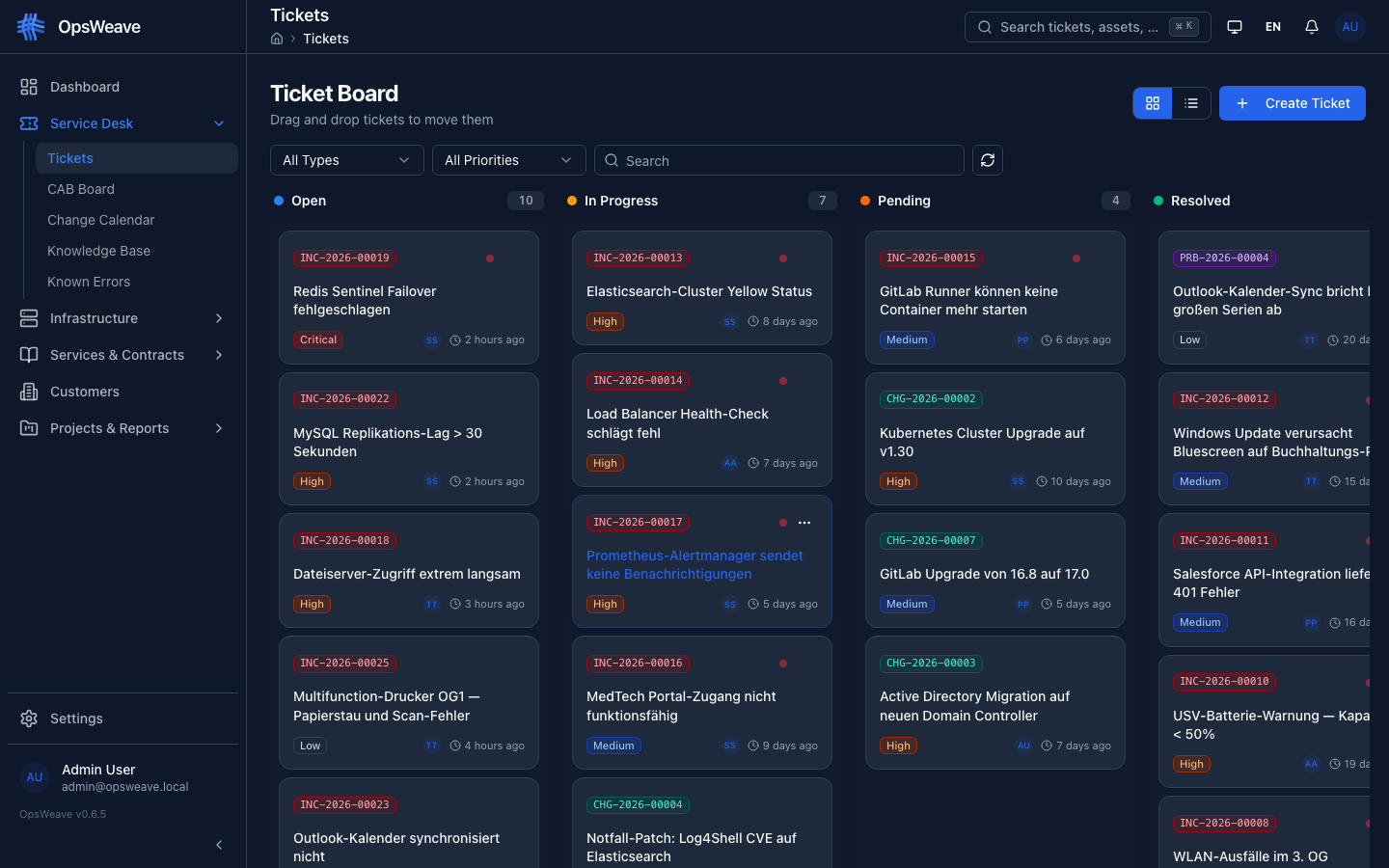
The ticket board displays all tickets in five columns:
- Open — Newly received, not yet in progress
- In Progress — Actively being worked on
- Pending — Waiting for external feedback
- Resolved — Solution implemented, awaiting confirmation
- Closed — Completed
Tickets can be moved between columns via drag & drop.
Ticket Detail
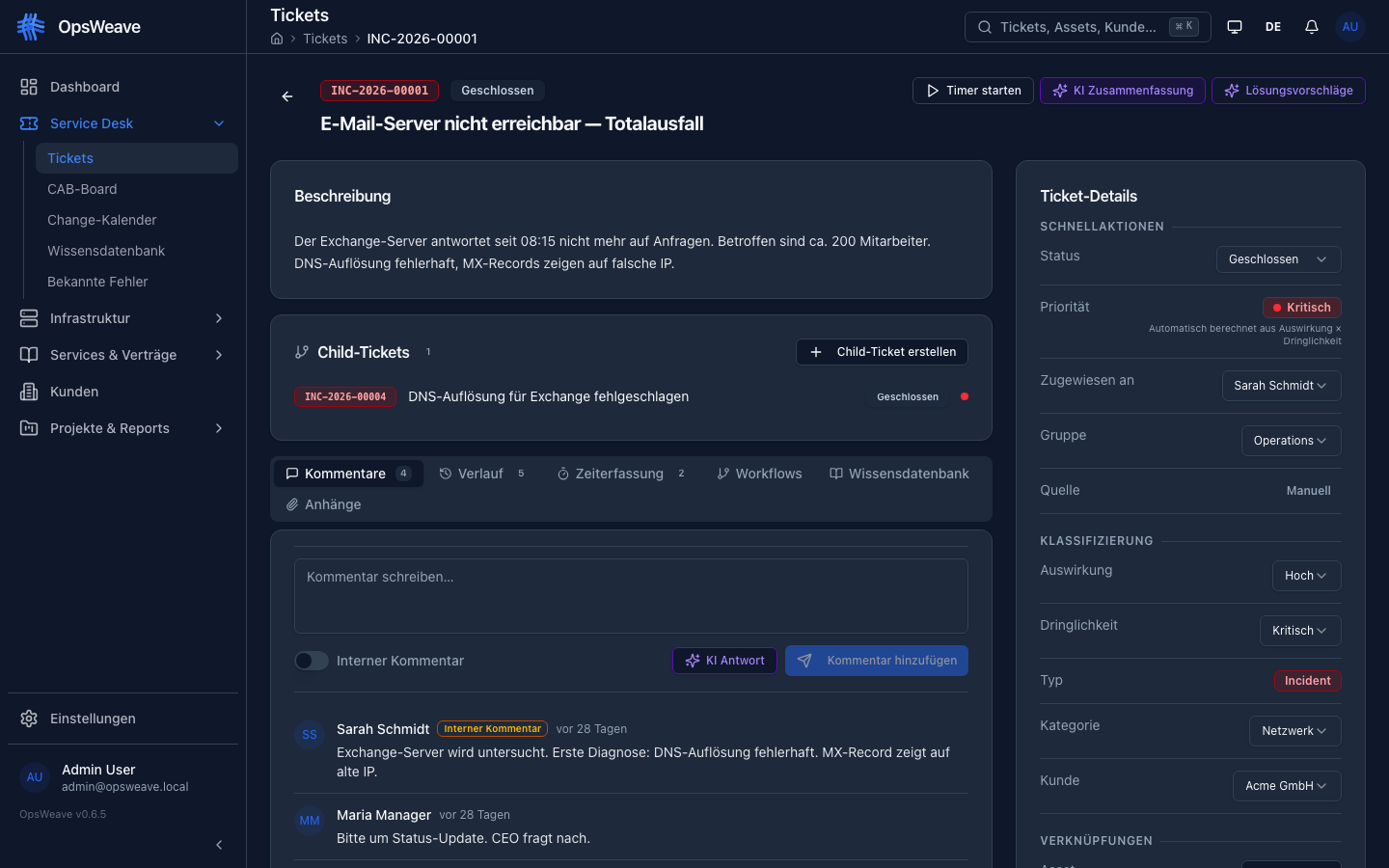
Each ticket has two sections:
Left Column — Content:
- Description (Markdown rendered)
- Child tickets (hierarchy)
- Tabs: Comments, History, Workflows, Knowledge Base
Right Column — Metadata:
- Status, Priority, Type, Impact, Urgency
- Assigned to (Agent + Group)
- Linked Asset
- Customer
- SLA information (tier, deadlines, breach indicator)
- Timestamps
Priority
Priority is automatically calculated from Impact x Urgency (ITIL matrix):
| Urgency High | Urgency Medium | Urgency Low | |
|---|---|---|---|
| Impact High | Critical | High | Medium |
| Impact Medium | High | Medium | Low |
| Impact Low | Medium | Low | Low |
SLA Tracking
SLA deadlines are automatically set when:
- The ticket has an SLA tier (Gold, Silver, Bronze), or
- The linked asset has an SLA tier (inherited)
SLA times (example Gold): Response ≤ 1h, Resolution ≤ 4h. When an SLA is breached, the ticket is marked in red.
Comments
- External comments — visible to agents and customers (portal)
- Internal notes — visible only to agents (dark highlighted)
- Comment sources:
agent,customer,email,system
History / Audit Trail
Every change to a ticket is logged in the history tab:
- Changed field (status, assignee, priority, etc.)
- Old and new value
- User and timestamp
Ticket Creation
Tickets are created via a dedicated page (not as a dialog). The page is divided into three sections:
- Basic Data: Title, description, type, subtype
- Classification: Impact x Urgency → automatic priority, category
- Assignment: Assignee, group, asset, customer
For Change tickets, an additional RFC section appears:
- Justification, implementation plan, rollback plan
- Risk assessment (level x likelihood)
- Planned start/end time
- CAB approval required (Yes/No)
Service Requests
In addition to Incidents, Problems, and Changes, there are Service Requests (SRQ) for standardized requests:
| Subtype | Description |
|---|---|
| Standard | Routine service request |
Parent-Child Tickets
Tickets can be linked hierarchically:
- A parent ticket can have multiple child tickets
- Child tickets must have the same type as the parent
- Close blocking: The parent cannot be closed until all child tickets are resolved or closed
Batch Updates
In the list view, multiple tickets can be edited simultaneously:
- Checkbox selection (max. 100 tickets)
- Bulk changes to status, priority, assignee, group
Sources
Tickets can originate from various sources:
| Source | Description |
|---|---|
manual | Manually created by an agent |
portal | Created by a customer in the self-service portal |
email | Automatically from incoming email |
monitoring | Automatically from a monitoring event |
api | Via REST API |
REST API
GET    /api/v1/tickets              # List (paginated, filterable)
POST   /api/v1/tickets              # Create
GET    /api/v1/tickets/:id          # Detail
PUT    /api/v1/tickets/:id          # Update
PATCH  /api/v1/tickets/:id/status   # Change status
PATCH  /api/v1/tickets/:id/assign   # Assign
GET    /api/v1/tickets/:id/comments # Comments
POST   /api/v1/tickets/:id/comments # Add comment
PATCH  /api/v1/tickets/batch         # Batch update (max 100)
GET    /api/v1/tickets/stats        # KPI statistics
GET    /api/v1/tickets/stats/timeline    # Timeline
GET    /api/v1/tickets/stats/by-customer # Per customer
GET    /api/v1/tickets/board        # Board view (Kanban)
GET    /api/v1/tickets/categories   # Categories
POST   /api/v1/tickets/categories   # Create category